How to remove the body of Automower® 308V, 312V and Aspire™ R6V
Follow these steps to remove the top cover and body of Automower® 308V, 312V and Aspire™ R6V, for example, if your robotic lawn mower requires a thorough cleaning.
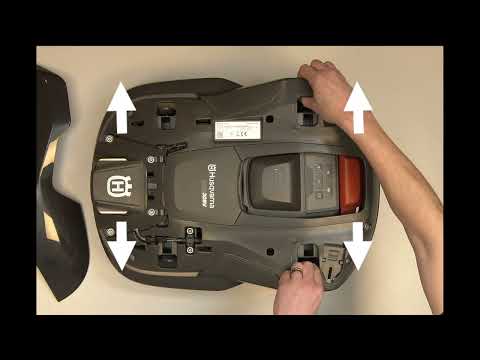
- Press the STOP button to stop the product if it is operating.
- Press the ON/OFF button for three seconds to turn the mower off.
- Place one hand on the Husqvarna logo to keep the mower in place. With the other hand, lift the top cover from the front on each side and pull it carefully upwards.
- Use both hands to press the rear clips outwards to release the body from the chassis. Repeat with the front clips.
- Lift the body carefully without pulling on the cable underneath. This cable cannot be disconnected.
- Lean the body against a wall to avoid stretching the cable.
Installing the body and top cover
- Align the body with the chassis and press into position both at the front and rear.
- Align the top cover with the slots in the body of the mower and press the top cover into position.
Important: If the top cover at the front of the mower is not properly clicked in, the hatch to access the cutting height adjustment knob will not open. Make sure to press the top cover firmly into place, so that the hatch can open.
Related articles: How to clean the camera lens on Automower® with AI vision technology | How to clean your Husqvarna Automower® and Husqvarna CEORA™ robotic lawn mower
Was this article helpful?