Troubleshoot camera errors on Automower® robotic lawn mowers with AI vision technology
If your Automower® robotic lawn mower with AI vision technology is bumping into objects, pausing unexpectedly or showing a camera-related message in the app, the cause is usually a dirty, wet or blocked camera lens. Find your situation below to resolve the issue.
Camera not working as expected
Robotic lawn mower bumps into objects or does not avoid them
Robotic lawn mower bumps into objects or does not avoid them
If your robotic lawn mower is not avoiding objects as expected, the camera glass may be dirty or blocked. You may see the message “Camera lens blocked” or “No object detection available” in the app.
- Check the camera glass for leaves, slugs or other debris and remove anything covering it.
- Rinse the camera with running water to clear away any remaining particles.
- Dry the camera carefully with a soft cloth.
Robotic lawn mower pauses during rain
Robotic lawn mower pauses during rain
Heavy rain can limit the camera’s ability to detect objects, causing your robotic lawn mower to pause. You may see the message “Camera lens wet” in the app. No action is needed; the lawn mower will resume operation when visibility improves.
Camera error that does not go away after cleaning
Camera error that does not go away after cleaning
If you still see a camera-related error after cleaning and drying the camera glass, there may be a problem with the vision technology module or a firmware issue. You may see the message “Vision system problem” in the app.
- Restart the lawn mower.
- If the problem persists, contact your Husqvarna dealer.
Camera visibility setting
On Automower® 405VE NERA, 410VE NERA, 430V NERA and 450V NERA, you can configure how your robotic lawn mower behaves when camera visibility is limited due to rain or dirt. In the app, go to More > Settings > Operation > Object avoidance and select one of the following options:
- Continue mowing: the mower continues operating when visibility is limited. The lawn mower may collide with objects.
- Pause mowing: the lawn mower pauses until visibility is restored.
Learn more about AI vision technology and object detection.
Robotic lawn mower moves randomly or in circles after leaving the charging station
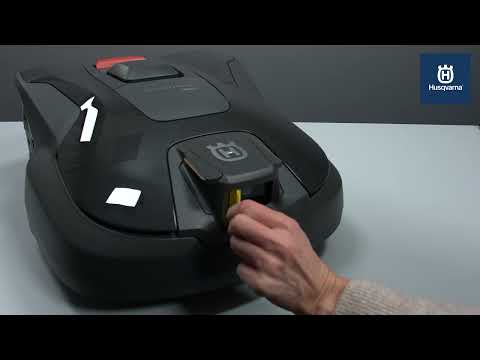
If your robotic lawn mower leaves the charging station and then moves randomly or in circles before stopping, the protective sticker on the camera glass may still be attached.
Automower® robotic lawn mowers with AI vision technology are shipped with a protective sticker (yellow or transparent) on the camera glass for protection during storage and transport. Remove this sticker before starting operation.